Sunday, March 23, 2008

Get Pinyin From Chinese Characters

Based on a JavaScript, I have added several functions to my blog page. With these functions, you can type in or copy some Chinese characters in the following text area. Then click the button "Get Pinyin".

You will see a list of annotated Chinese characters below the input area. All pinyin have tones labeled.

Note:
  • Don't put too many words at a time, it may take a while to find Pinyin for them.

  • You may not get the Pinyin for your Chinese words since some Chinese characters have more than one sounds. Only the first one is searched.


Input Chinese :( Less than 100 words)


guō
nián
hǎo


Thursday, March 20, 2008

Input Chinese on Mac

I got a new Mac. I like it very much!

As I did in Windows, one thing I have to do is to find out a way to input Chinese in Mac. Actually, it is not hard to do it. Mac provides Chinese in System Preference. Select International icon there. There are three tabs available. Two are related to Chinese. One is Language, where Simplified Chinese is in the language list. Another one is Input Menu. Simplified Chinese is there with Pinyin input or ITABC(I am not sure why ).

I think you have to reboot Mac to get the input method available. A small language input menu item is displayed on the right upper conner. If you like to input Chinese, select the menu item ITABC from there. Then you can type in Pinyin. Microsoft provides Pinyin input method by installing another package. You have to download it from Microsoft IME package. If you cannot find the link, you can google Pinyin input for Windows.

Mac comes with Pinyin input in the OS X Leopard. It is very easy to use. It also memories your usage. The previous Chinese you input will be moved to the first position when I type next time! The only thing I don't like is that you have to use mouse to scroll down the next page to get more Chinese list. I tried to use page up or page down keys but not working. There may be a simple way to do that.

Another good tool or input is available in Mac is Special Characters... in most context menu, or Alt+Command+T shortcut key.
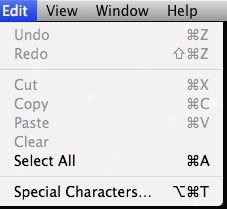


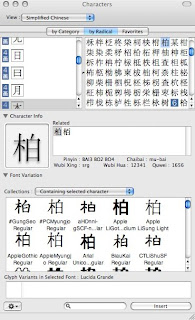
Then a characters window is open. Select Simplified Chinese from View. You can insert Chinese by three options: by Category, by Radical, and Favorites. For favorites, it is empty at the beginning. I think you have to add characters to your favorites. The first two are very useful!

I like by Radical method. This is the most common why to find out Chinese by their drawing structure. First, find out the radial part by strokes. Select a radical on the left list, then all the Chinese by that radical is listed on the right panel by strokes. Most cases I use Pinyin input directly. However, if I don't know the pronunciation, I have to find it from dictionary by Radical. Mac provides this handy tool there. More than that, you can also find out Chinese characters' Pinyin and other input codes in the same window. Two more options available. One is Character Info, which provides Pinyin and other input codes. Another one is the Font Variation. This one list all the fonts containing this character! This gives a visual view of all Chinese fonts in your Mac.
Sunday, February 3, 2008

Simplified Chinese Character Set GB2312

GB2312 is an official standard for simplified Chinese issued in 1980 by the People's Republic of China. It is actually a encoding mechanism originally for PC, now widely adopted by Internet web. If you see Chinese characters in a web site, mostly the Chinese characters are in the computer digitized form of GB2312 encoding.

GB2312 include all the symbols, English letters, other language letters, and Chinese characters in the set. All the items in GB2312 are arrange by matrix 94x94 (rows by columns). Row 16-55 contain level 1 Chinese characters(3755), ordered by Pinyin, and row 56-87 for level 2 Chinese characters(3008), by radical then stroke. Therefore, the total number of official Chinese in GB2312 is 6763. In addition to that, GB2312 includes 682 non-Hanzi characters. Here is the link, GB2312 Character Set, with detail information about GB2312 and all Chinese characters by Dr. Herong Yang.

It is very interesting to know that GB2312 is using Pinyin to arrange Chinese characters. The encoding is based on ASCII encoding in sequence. As you know that many Chinese are in the same Pinyin symbol such as many shi4 in Chinese. It is very easy to find Chinese pinyin by its encoding. Actually, many tools on the web are programed in this manner.

Saturday, January 26, 2008

Chinese New Year: Feb 7, 2008

Chinese New Year for 2008 will be on February 7, 2008. Here is a link with more information about Chinese New Year.

Two commonly used greeting phrases on the Chinese New Year day are:

新 年 快 乐
xīn nián kuài lè

过 年 好
guō nián hǎo

Here are what I did to get and to display above Chinese words and pinyins. I copied the words from the Wikipedia page. I found the pinyin with tone marks for the first phrase; however, there is no pinyin for the second one.

To get the pinyin, I googled web and found many tools to convert Chinese to pinyin on-line. This tool convert Chinese to pinyin can get pinyin with tone marks. The result is very nice. The pinyins are displayed right above Chinese characters(I may to find some time to figure out how to this is done). As well, this tool looks like that a open-source library (or http://pinyin4j.sourceforge.net/) is used to do the job. Very cool!

Tuesday, December 11, 2007

A Blog for Learning Chinese

I have been teaching Learn Chinese with the Calgary Education Board's continuing education program since 1991. I have created my own text box for this special program. I enjoy teaching Chinese for beginners very much!

Recently, I finished my Fall program and I promised to my students that I am going to start a blog about my teaching experience and any related topics, as well as my program updates. Wo3 xi1wang4 that I'll continue to add more dong1xi1 to this blog.